
Ở bài trước ta đang dừng lại ở việc thiếu cấu hình u-boot. Bài này ta sẽ compile kernel và thêm file cấu hình uboot.env để khiến bootloader chạy ổn
1. Fetch kernel code và Compile
1.1 Clone source code
git clone https://git.kernel.org/pub/scm/linux/kernel/git/torvalds/linux
Khá là lâu, nên các bạn đá miếng bánh, uống tí cà phê chill chill rồi quay lại check sau. Mình clone về check thì là 5,1 Gb
zk47@ltu:~/Learning/Bootlin_practice/linux$ du -sh .
5,1G    .
1.2 Fetch statble version
Okay, các bạn vào thư mục linux, nhưng đây đang là bản release, an toàn cho việc build thì ta fetch bản stable về
cd linux
git remote add stable https://git.kernel.org/pub/scm/linux/kernel/git/stable/linux
git fetch stable
Các bạn kiểm tra branch, rồi chọn phiên bản stable cuối
zk47@ltu:~/Learning/Bootlin_practice/linux$ git branch -a
...
  remotes/stable/linux-6.8.y
  remotes/stable/linux-6.9.y
  remotes/stable/linux-rolling-lts
  remotes/stable/linux-rolling-stable
  remotes/stable/master
Ở đây mình sẽ chọn linux-6.9.y
zk47@ltu:~/Learning/Bootlin_practice/linux$ git checkout remotes/stable/linux-6.9.y
1.3 Cấu hình kernel, make zImage và device tree file
Đầu tiên ta cài toolchain đã build ở bài 1 vào PATH
export PATH=$HOME/x-tools/arm-training-linux-uclibcgnueabihf/bin:$PATH

export ARCH=arm
export CROSS_COMPILE=arm-linux-
Rồi ta vào menuconfig của và cấu hình
make menuconfig
Theo gợi ý từ Bootlin, thì ta sẽ tắt CONFIG_GCC_PLUGINS đi.
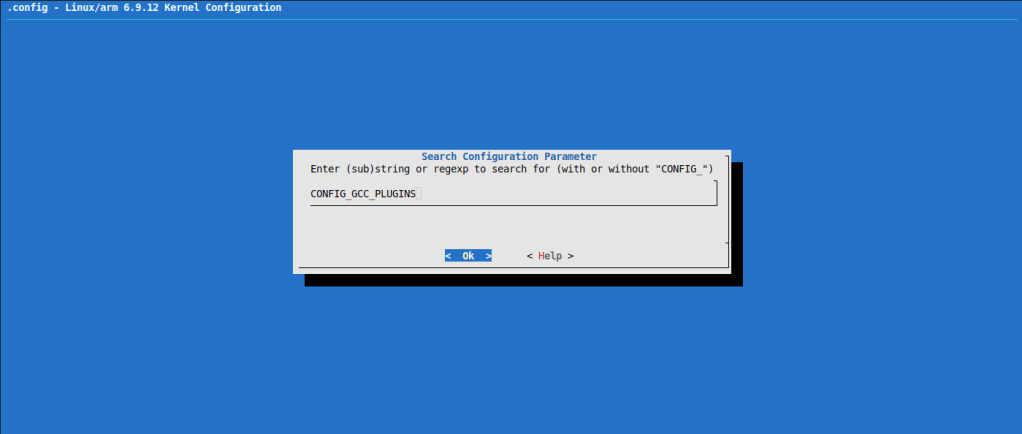
Ta bấm “/” rồi search cụm từ (Nếu bạn quen thao tác với “vi” trên linux thì làm việc với menuconfig này khá tương tự)
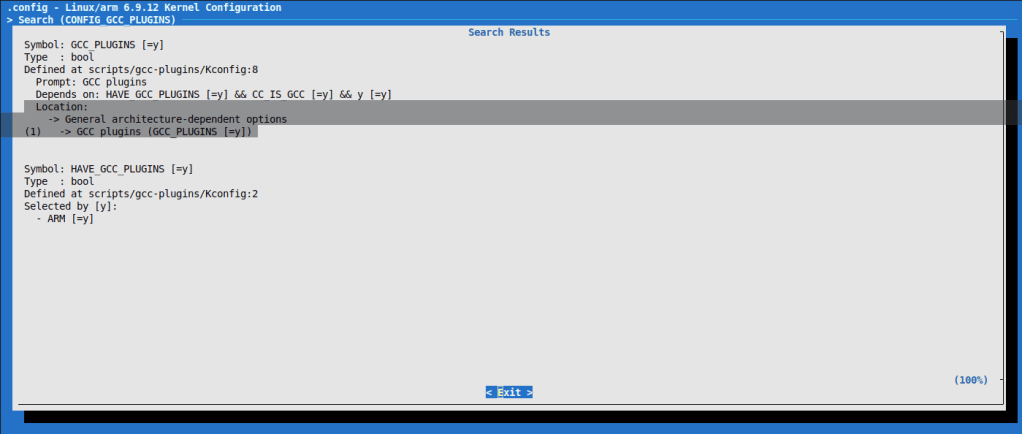
Vậy địa chỉ tại
Location: │
│ -> General architecture-dependent options │
│ (1) -> GCC plugins (GCC_PLUGINS [=y])
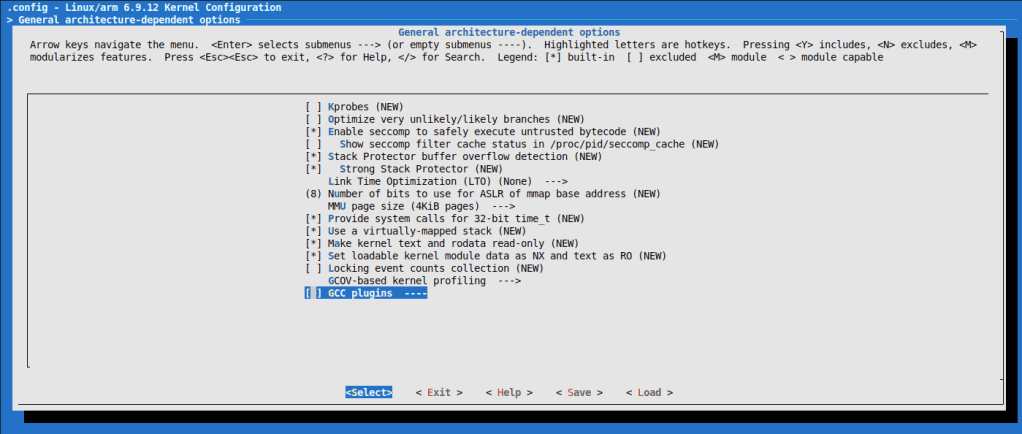
(Bấm space để bỏ lựa chọn * -built-in)
Okay, make thôi (-jn, n ở đây bạn nên để thấp hơn số luồng trên máy bạn. Máy mình 14 cores, 20 luồng, nên mình để là -j18)
make zImage -j18
make dtbs
Nếu trong quá trình build, bị quá RAM, gây nghẽn, và bị restart máy (Hoặc đơn giản bạn tắt terminal đi). Khi chạy lại các bạn lưu ý làm các bước sau
make mrproper
export ARCH=arm
export CROSS_COMPILE=arm-training-linux-uclibcgnueabihf-
make menuconfig #Tắt option GCC lại
make zImage -jn
make dtbs
Okay, chạy đến đây là thành công, kết quả sẽ lưu tại arch/arm/boot/zImage và arch/arm/boot/dts/ti/omap/
  LD      arch/arm/boot/compressed/vmlinux
  OBJCOPY arch/arm/boot/zImage
  Kernel: arch/arm/boot/zImage is ready
zk47@ltu:~/Learning/Bootlin_practice/linux$ find . -name "zImage"
./arch/arm/boot/zImage
zk47@ltu:~/Learning/Bootlin_practice/linux$ find . -name "am335x-boneblack.dtb"
./arch/arm/boot/dts/ti/omap/am335x-boneblack.dtb
2. Test zImage và dtb
2.1 Copy 2 file zImage và am335x-boneblack.dtb lên thẻ nhớ
Ta copy 2 file zImage và am335x-boneblack.dtb kia vào phân vùng boot trên thẻ nhớ
zk47@ltu:~/Learning/Bootlin_practice/linux$ sudo cp ./arch/arm/boot/dts/ti/omap/am335x-boneblack.dtb ./arch/arm/boot/zImage /media/zk47/boot/
zk47@ltu:/media/zk47/boot$ tree
.
├── am335x-boneblack.dtb
├── MLO
├── u-boot.img
└── zImage

0 directories, 4 files
2.2 Thao tác với u-boot
Mình sẽ tạo file env sau, giờ mình sẽ thao tác tay trước. Các bạn làm theo các câu lệnh sau, mình sẽ giải thích bên dưới
Các bạn bấm Space khi thấy đoạn log Hit anykey to stop autoboot. Ta sẽ vào được terminal của u-boot
U-Boot 2023.01 (Sep 18 2025 - 23:22:33 +0700)

CPU  : AM335X-GP rev 2.1
Model: TI AM335x BeagleBone Black
DRAM:  512 MiB
Core:  160 devices, 18 uclasses, devicetree: separate
WDT:   Started wdt@44e35000 with servicing every 1000ms (60s timeout)
NAND:  0 MiB
MMC:   OMAP SD/MMC: 0, OMAP SD/MMC: 1
Loading Environment from FAT... Unable to read "uboot.env" from mmc0:1...
<ethaddr> not set. Validating first E-fuse MAC
Net:   eth2: ethernet@4a100000, eth3: usb_ether
Hit any key to stop autoboot:
=>
=> setenv bootargs console=ttyS0,115200n8
=> saveenv
- Bật UART để có debug log, lưu lại môi trường (save env)
=> fatload mmc 0:1 0x80200000 zImage
=> fatload mmc 0:1 0x80f00000 am335x-boneblack.dtb
- Load file fat fatload
- mmc : loại vùng nhớ
- 0:1 mmc0 phân vùng 1
- 0x80200000 : địa chỉ đích
- zImage: tên file
=> bootz 0x80200000 - 0x80f00000
- bootz: u-Boot command để boot một zImage
- 0x80200000: địa chỉ kernel image trong RAM
- – : rootfs initrd (initramfs) → ở đây không có nên để dấu gạch ngang.
- 0x80f00000: địa chỉ của DTB (Device Tree Blob) hay FDT (Flattened Device Tree)
Nếu chưa biết câu lệnh này là gì ta sẽ gõ
=> help bootz
bootz - boot Linux zImage image from memory

Usage:
bootz [addr [initrd[:size]] [fdt]]
    - boot Linux zImage stored in memory
	The argument 'initrd' is optional and specifies the address
	of the initrd in memory. The optional argument ':size' allows
	specifying the size of RAW initrd.
	When booting a Linux kernel which requires a flat device-tree
	a third argument is required which is the address of the
	device-tree blob. To boot that kernel without an initrd image,
	use a '-' for the second argument. If you do not pass a third
	a bd_info struct will be passed instead
Okay, sau khi chạy xong câu lệnh bootz, ta sẽ khởi động được kernel, Nhưng chưa có root file system nên ta sẽ gặp lỗi Kernel Panic sau
[    3.540038] Kernel panic - not syncing: VFS: Unable to mount root fs on unknown-block(0,0)
[    3.548350] CPU: 0 PID: 1 Comm: swapper/0 Not tainted 6.9.12 #1
[    3.554307] Hardware name: Generic AM33XX (Flattened Device Tree)
[    3.560434] Call trace:
[    3.560456]  unwind_backtrace from show_stack+0x10/0x14
[    3.568289]  show_stack from dump_stack_lvl+0x50/0x64
[    3.573387]  dump_stack_lvl from panic+0x10c/0x368
[    3.578222]  panic from mount_root_generic+0x1d4/0x278
[    3.583416]  mount_root_generic from prepare_namespace+0x1fc/0x258
[    3.589648]  prepare_namespace from kernel_init+0x1c/0x12c
[    3.595184]  kernel_init from ret_from_fork+0x14/0x28
[    3.600276] Exception stack(0xe0009fb0 to 0xe0009ff8)
[    3.605362] 9fa0:                                     00000000 00000000 00000000 00000000
[    3.613586] 9fc0: 00000000 00000000 00000000 00000000 00000000 00000000 00000000 00000000
[    3.621807] 9fe0: 00000000 00000000 00000000 00000000 00000013 00000000
[    3.628470] ---[ end Kernel panic - not syncing: VFS: Unable to mount root fs on unknown-block(0,0) ]---
Để tiện hơn cho bài tới mình sẽ lưu lại biến môi trường này trong 1 file nào đó.
- uboot.env : ở bài trước ta đã thấy u-boot hiển thị lỗi không tìm thấy uboot.env. Tuy nhiên file này là binary ta sẽ khó sửa nếu cần.
- uEnv.txt : text file, dễ dàng sửa đổi khi cần.
2.3 Tạo file uEnv.txt cho u-boot
Mình cắm lại thẻ nhớ vào máy tính, và ghi lại những command mình đã chạy bên trên khi khởi động. U-boot sẽ tự tìm đến uEnv.txt và chạy các command ở đây
zk47@ltu:/media/zk47/boot$ touch uEnv.txt
zk47@ltu:/media/zk47/boot$ vi uEnv.txt
zk47@ltu:/media/zk47/boot$ cat uEnv.txt
bootargs=console=ttyO0,115200n8 root=/dev/mmcblk0p2 rw rootfstype=ext4 rootwait

loadzimage=fatload mmc 0:1 0x80200000 zImage
loadfdt=fatload mmc 0:1 0x80F00000 am335x-boneblack.dtb

uenvcmd=run loadzimage
Okay, và mở lên lại, tuy không găp lỗi uboot.env nữa, nhưng vẫn không chạy
U-Boot 2023.01 (Sep 18 2025 - 23:22:33 +0700)

CPU  : AM335X-GP rev 2.1
Model: TI AM335x BeagleBone Black
DRAM:  512 MiB
Core:  160 devices, 18 uclasses, devicetree: separate
WDT:   Started wdt@44e35000 with servicing every 1000ms (60s timeout)
NAND:  0 MiB
MMC:   OMAP SD/MMC: 0, OMAP SD/MMC: 1
Loading Environment from FAT... OK
Net:   eth2: ethernet@4a100000, eth3: usb_ether
Hit any key to stop autoboot:  0
switch to partitions #0, OK
mmc0 is current device
Scanning mmc 0:1...
70308 bytes read in 9 ms (7.5 MiB/s)
Working FDT set to 88000000
No EFI system partition
BootOrder not defined
EFI boot manager: Cannot load any image
switch to partitions #0, OK
mmc1(part 0) is current device
Scanning mmc 1:1...
Working FDT set to 88000000
BootOrder not defined
EFI boot manager: Cannot load any image
## Error: "bootcmd_nand0" not defined
Theo mình tìm hiểu thì nó sẽ cần extlinux/extlinux.conf trong các phiên bản u-boot mới sau này. https://forum.beagleboard.org/t/boot-process-of-custom-build-getting-stuck/38716
2.4 Tạo file extlinux/extlinux.conf
Các bạn lại tút thẻ nhớ ra và tạo thư mục boot/extlinux rồi file extlinux.conf trong đó
Nội dung như sau
zk47@ltu:/media/zk47/boot/extlinux$ cat extlinux.conf
# BeagleBone Black boot config (extlinux.conf)

LABEL bbb
    KERNEL /zImage
    FDT /am335x-boneblack.dtb
    APPEND root=/dev/mmcblk0p2 rw rootfstype=ext4 rootwait console=ttyO0,115200n8
Vậy thôi là ta đã tự động hóa được quá trình u-boot rồi.
Ở bài tiếp theo mình sẽ cùng các bạn tạo ra Root file system from scratch với Busybox
Mong được các bạn tiếp tục đón đọc và ủng hộ
 Embedded Linux A-Z
Bình luận về bài viết này