[Yocto-BBB] 9. Using devtool, creating patches and installing IPK files
Translated from the Vietnamese original; wording may still be rough. Read the original →
In post 5 on adding a driver for the USB wifi adapter I showed you how to create recipes by hand to fetch code from git and build it. In post 8 I also put the main.c i2c code on git, but after copying it to the board we have to fix I2C_DEV and I2C_ADDR.
(If you run into difficulties following the blog, you can refer to my hands-on video at the end of the post)
In this post I show you how to work with git source code that already has recipes, and how to create new recipes, using commands such as devtool modify, devtool add, devtool finish. Then I show you how to create patches
1. Using devtool
1.1 Creating a new recipe with devtool
We have code on git at https://github.com/Zk47T/ssd1306
and want to create recipes that fetch this code.
We use the devtool command (I remember it as development tool).
devtool add ssd1306 https://github.com/Zk47T/ssd1306.git --srcbranch main
This creates the ssd1306 recipe, with source from git, branch main, in the workspace inside the build-bbb folder
zk47@ltu:~/Learning/yocto-bbb/build-bbb/workspace$ tree
.
├── appends
│   └── ssd1306_git.bbappend
├── conf
│   └── layer.conf
├── README
├── recipes
│   └── ssd1306
│       └── ssd1306_git.bb
└── sources
    └── ssd1306
        ├── README.md
        └── src
            └── main.c

7 directories, 6 files
I will go through what each of these files means in the devtool modify section below, since the workspace folder means the same thing there.
For now I won't change anything. Finish right away
devtool finish ssd1306 ../meta-bbb/recipes-display/ssd1306
This copies the ssd1306 recipes to the target folder
├── recipes-display
│   └── ssd1306
│       └── ssd1306_git.bb
So we have finished adding a new recipe that takes its source from git.
1.2 Modifying code from git with devtool
1.2.1 Normal bitbake
Now I have recipes for both SSD1306 and the USB Wifi Driver
If you just run bitbake as usual, it runs these main tasks in order
do_fetch: fetch the code from gitdo_unpack: extract the source code into the folderin the variable $Sdo_patch: apply the patches (.patch) from the recipe or layerdo_compile: compile the sourcedo_install: install the output files into a folder emulating the rootfsdo_package: package the installed files into.ipk,.debor.rpmpackages depending on the distro
And the output is here
/build-bbb/tmp/work/armv7at2hf-neon-poky-linux-gnueabi/ssd1306/1.0+gitAUTOINC+b1397ef7ec-r0/git
If you want to see more clearly what each task does, you can run the following to follow the changes
bitbake -c
bitbake -c fetch ssd1306
However, you should not change code from git inside tmp, because tmp is just temporary. For a quick hack you could stop at do_patch, edit, then do_package, which works, but nobody does that :v
1.2.2 Devtool modify
The effective way to build a package with changes to source code that lives on git is to use devtool modify
devtool modify ssd1306
Then we work in build-bbb/workspace, change whatever we want, and bitbake to build.
But you may wonder: why this time does bitbake take the source from workspace instead of git?
Let's go through each file in the workspace folder
zk47@ltu:~/Learning/yocto-bbb/build-bbb/workspace$ tree
.
├── appends
│   └── ssd1306_git.bbappend
├── conf
│   └── layer.conf
├── README
├── recipes
│   └── ssd1306
│       └── ssd1306_git.bb
└── sources
    └── ssd1306
        ├── README.md
        └── src
            └── main.c

7 directories, 6 files
appends/ssd1306_git.bbappend
FILESEXTRAPATHS:prepend := "${THISDIR}/${PN}:"
FILESPATH:prepend := "/home/zk47/Learning/yocto-bbb/build-bbb/workspace/sources/ssd1306/oe-local-files:"
# srctreebase: /home/zk47/Learning/yocto-bbb/build-bbb/workspace/sources/ssd1306

inherit externalsrc
# NOTE: We use pn- overrides here to avoid affecting multiple variants in the case where the recipe uses BBCLASSEXTEND
EXTERNALSRC:pn-ssd1306 = "/home/zk47/Learning/yocto-bbb/build-bbb/workspace/sources/ssd1306"
EXTERNALSRC_BUILD:pn-ssd1306 = "/home/zk47/Learning/yocto-bbb/build-bbb/workspace/sources/ssd1306"

# initial_rev: b1397ef7ec704d8631b73b2c0521f9c804954d3a
The most important thing here is that 2 macros are set
EXTERNALSRC and EXTERNALSRC_BUILD: meaning the build now takes the external source instead of git.
Devtool runs do_fetch, do_unpack, do_patch, do_configure in this workspace folder, so the code from git now lives in workspace.
The main branch becomes the devtool branch after all patches are applied.
zk47@ltu:~/Learning/yocto-bbb/build-bbb/workspace/sources/ssd1306$ git branch
* devtool
  main
conf/layer.conf
# ### workspace layer auto-generated by devtool ###
BBPATH =. "${LAYERDIR}:"
BBFILES += "${LAYERDIR}/recipes/*/*.bb \
            ${LAYERDIR}/appends/*.bbappend"
BBFILE_COLLECTIONS += "workspacelayer"
BBFILE_PATTERN_workspacelayer = "^${LAYERDIR}/"
BBFILE_PATTERN_IGNORE_EMPTY_workspacelayer = "1"
BBFILE_PRIORITY_workspacelayer = "99"
LAYERSERIES_COMPAT_workspacelayer = "${LAYERSERIES_COMPAT_core}"
The key line here is
BBFILE_PRIORITY_workspacelayer = "99"
This means workspace is the layer with the highest priority, able to override all lower layers.
zk47@ltu:~/Learning/yocto-bbb/build-bbb$ bitbake-layers show-layers
NOTE: Starting bitbake server...
WARNING: Layer meta-bbb should set LAYERSERIES_COMPAT_meta-bbb in its conf/layer.conf file to list the core layer names it is compatible with.
layer                 path                                      priority
==========================================================================
meta                  /home/zk47/Learning/yocto-bbb/poky/meta   5
meta-poky             /home/zk47/Learning/yocto-bbb/poky/meta-poky  5
meta-yocto-bsp        /home/zk47/Learning/yocto-bbb/poky/meta-yocto-bsp  5
meta-oe               /home/zk47/Learning/yocto-bbb/meta-openembedded/meta-oe  5
meta-arm-toolchain    /home/zk47/Learning/yocto-bbb/meta-arm/meta-arm-toolchain  5
meta-arm              /home/zk47/Learning/yocto-bbb/meta-arm/meta-arm  5
meta-ti-bsp           /home/zk47/Learning/yocto-bbb/meta-ti/meta-ti-bsp  6
meta-ti-extras        /home/zk47/Learning/yocto-bbb/meta-ti/meta-ti-extras  6
meta-bbb              /home/zk47/Learning/yocto-bbb/meta-bbb    15
workspace             /home/zk47/Learning/yocto-bbb/build-bbb/workspace  99
---> So running devtool modify has these main effects:
- Pulls the code from git to local and puts it in the workspace
- Creates the
workspacelayer with the highestpriorityand adds it tobuild-bbb/bbblayers.conf - Sets the source to
EXTERNALSRC, no longer tied to git at all
So once you use devtool, changes in the layer or on git related to the code no longer matter, because we have made it local :vv
2. Creating patches
Creating a patch is mainly useful when you work with a recipes whose code comes from a git repo you have no commit rights to, or that is simply waiting for a merge.
2.1 Creating a clean environment :v
Usually when creating patches I don't use the workspace any more, so I remove ssd1306 from workspace.
I delete the following folders and files
/build-bbb/workspace/sources/ssd1306
/build-bbb/workspace/appends/ssd1306_git.bbappend
I don't know if this is the proper way, but I usually do it when I want to work with the code on git instead of local.
Or you can delete the workspace folder and then remove the workspace layer from /build-bbb/conf/bblayers.conf
Then I clean and rebuild to get the git folder in build-bbb
bitbake -c cleanall ssd1306
bitbake ssd1306
2.2 Changing code and creating a patch
Open the git folder and check the branch
zk47@ltu:~/Learning/yocto-bbb/build-bbb/tmp/work/armv7at2hf-neon-poky-linux-gnueabi/ssd1306/1.0+gitAUTOINC+b1397ef7ec-r0/git$ git branch
* main
Change main.c. As I noted in the previous post, I2C_ADDR and I2C_DEV may differ, and indeed they do. My original code was for the STM32MP157, so for the Beaglebone Black the only small difference is that the BBB uses i2c-2
zk47@ltu:~/Learning/yocto-bbb/build-bbb/tmp/work/armv7at2hf-neon-poky-linux-gnueabi/ssd1306/1.0+gitAUTOINC+b1397ef7ec-r0/git$ git diff src/main.c
diff --git a/src/main.c b/src/main.c
index 5e1136d..628dc29 100644
--- a/src/main.c
+++ b/src/main.c
@@ -8,7 +8,7 @@
 #include

 #define I2C_ADDR 0x3C
-#define I2C_DEV "/dev/i2c-1"
+#define I2C_DEV "/dev/i2c-2"

 int i2c_fd;
After editing the code, commit and create the patch
git add src/main.c
git commit -m "ssd1306-bbb"
git format-patch HEAD~1
It creates a patch named after the commit message, covering HEAD-1 --> HEAD: 0001-ssd1306-bbb.patch
zk47@ltu:~/Learning/yocto-bbb/build-bbb/tmp/work/armv7at2hf-neon-poky-linux-gnueabi/ssd1306$ tree
.
└── 1.0+gitAUTOINC+b1397ef7ec-r0
    ├── git
    │   ├── 0001-ssd1306-bbb.patch
    │   ├── README.md
    │   └── src
    │       └── main.c
2.3 Changing the recipe so the build applies the patch
Copy 0001-ssd1306-bbb.patch to meta-bbb/recipes-display/ssd1306/ssd1306
meta-bbb/recipes-display/ssd1306$ tree
.
├── ssd1306
│   └── 0001-ssd1306-bbb.patch
└── ssd1306_git.bb
We change the content of ssd1306_git.bb as follows and build
LICENSE = "CLOSED"
LIC_FILES_CHKSUM = ""

FILESEXTRAPATHS:prepend := "${THISDIR}/${PN}:"

SRC_URI = "git://github.com/Zk47T/ssd1306.git;protocol=https;branch=main \
           file://0001-ssd1306-bbb.patch"

PV = "1.0+git${SRCPV}"
SRCREV = "b1397ef7ec704d8631b73b2c0521f9c804954d3a"

S = "${WORKDIR}/git"

do_compile() {
    ${CC} ${LDFLAGS} ${S}/src/main.c -o ssd1306
}

do_install() {
    install -d ${D}${bindir}
    install -m 0755 ssd1306 ${D}${bindir}/ssd1306
}
do_compile and do_install are no different from doing the following on the board
gcc main.c -o ssd1306
cp ssd1306 /usr/bin
chmod 0755 /usr/bin/ssd1306
Here is the output
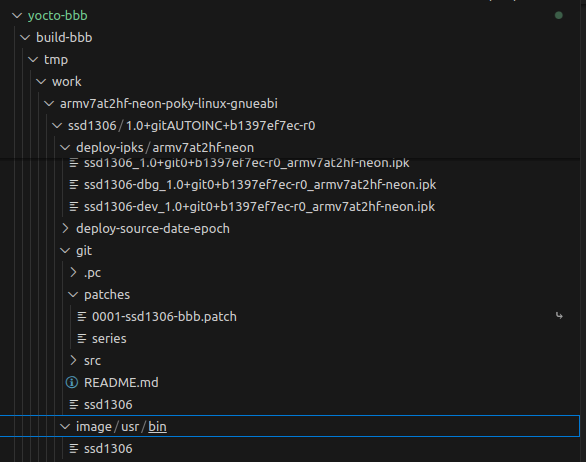
patches0001 has been copied into the git directorymain.chas the patch applied- the image folder now contains
/usr/bin/ssd1306
3. Using IPK files
In earlier posts, to add this package to the image you just added ssd1306 to IMAGE_INSTALL:append. But what if after building I want to test it on a board that has already been flashed?
That is when we use an IPK file. If you use android you have heard of apk files; this is similar
3.1 Add the opkg package
To install an IPK we need to add the opkg package to the board.
If you use ubuntu you are familiar with using dpkg to install .deb files. This is the same idea. IPK stands for internet package, and opkg is the package manager
Rebuild the image and flash it to the board
3.2 Copy and install the ipk on the board
In the picture above there is deploy-ipks; copy the first ipk to the board: ssd1306_1.0+git0+b1397ef7ec-r0_armv7at2hf-neon.ipk. The most convenient way is scp
I have not made the network settings persistent yet, so every boot I have to reconnect
ip link set wlan0 up
wpa_supplicant -B -i wlan0 -c /etc/wpa_supplicant.conf
dhcpcd wlan0
Then scp the file to the board
zk47@ltu:~$ scp ssd1306_1.0+git0+b1397ef7ec-r0_armv7at2hf-neon.ipk root@172.20.10.3:~/
root@172.20.10.3's password:
ssd1306_1.0+git0+b1397ef7ec-r0_armv7at2hf-neo 100% 2946   423.5KB/s   00:00
Now install the IPK
mount -o rw,remount /
opkg install --force-reinstall --force-depends ssd1306_1.0+git0+b1397ef7ec-r0_armv7at2hf-neon.ipk
- The board is normally
read-only, so here Imountit again withread-writepermission --force-reinstall: if this package was already on the board, you have to force a reinstall for it to install again--force-depends: skip dependency checks; at first I got aglibversion mismatch, but my code doesn't use anything special, so the lib difference doesn't matter :vv
Now check /usr/bin and ssd1306 is there, and we can run it directly from anywhere
root@beaglebone:~# ls -l /usr/bin/ssd1306
-rwxr-xr-x 1 root root 5916 Jul 17  2025 /usr/bin/ssd1306
root@beaglebone:~# ssd1306
root@beaglebone:~#
This post is quite long because I wanted the hands-on to flow from start to end. If there are mistakes, I welcome readers' feedback.
In the next post I will add support for booting from eMMC