[Yocto-BBB] 13. Building Weston, fixing input and dnd errors
Translated from the Vietnamese original; wording may still be rough. Read the original →
When I started, I did not expect to write this post; I thought I would go straight to the RDP + Weston post. Because on the STM32MP157 it built right away, but on this Beaglebone Black it took me 2 days to get Weston working more or less properly.
The method in this post is how I got it to show the GUI and accept the mouse and keyboard. But I believe Weston is still not fully working as it should.
The Beaglebone black hardware is quite old, so it needed a lot of tweaking to bring up Weston. I split this into 2 sections: 1 is how to fix it, 2 is why I arrived at that fix.
I hope you won't have to go through building Weston on the Beaglebone Black as painfully as I did :vv.
You can follow section 1 and then go straight to post 14. Weston + RDP
1. How to fix it
local.conf
DISTRO_FEATURES:append = " systemd pam"
VIRTUAL-RUNTIME_init_manager = "systemd"
DISTRO_FEATURES_BACKFILL_CONSIDERED += "sysvinit"
VIRTUAL-RUNTIME_initscripts = ""

#If you use Yocto 4.0 Kirkstone, prefer version 8.0.0
PREFERRED_VERSION_weston = "8.0.0"

IMAGE_INSTALL:append = " libxcursor evtest libinput xkeyboard-config weston-examples adwaita-icon-theme hicolor-icon-theme udev adwaita-icon-theme-cursors libinput-bin "

IMAGE_INSTALL:append = " kernel-modules kernel-module-evdev kernel-module-usbhid "

KERNEL_MODULE_AUTOLOAD:append = " evdev usbhid "
If you use Yocto 5.0 you do not need to add and edit weston.bb and weston.bbappend as below
weston.bb
The Beaglebone Black is not compatible with Weston 10.0, so we have to downgrade to Weston 8.0. Weston 8.0 lives in poky/dunfell, so clone it and copy it into your layer
git clone -b kirkstone git://git.yoctoproject.org/poky/
I am still using meta-bbb as my own layer, so I copy it there; the final structure looks like this
zk47@ltu:~/Learning/yocto-bbb/meta-bbb/recipes-graphics$ tree
.
└── wayland
    ├── libinput
    │   ├── CVE-2022-1215.patch
    │   └── determinism.patch
    ├── libinput_1.15.2.bb
    ├── mtdev_1.1.6.bb
    ├── wayland
    │   ├── 0001-build-Fix-strndup-detection-on-MinGW.patch
    │   ├── 0001-meson-tests-add-missing-dependencies-on-protocol-hea.patch
    │   ├── 0002-Do-not-hardcode-the-path-to-wayland-scanner.patch
    │   ├── 0002-meson.build-find-the-native-wayland-scanner-directly.patch
    │   ├── CVE-2021-3782.patch
    │   └── run-ptest
    ├── weston
    │   ├── 0001-weston-launch-Provide-a-default-version-that-doesn-t.patch
    │   ├── 0002-desktop-shell-Remove-no-op-de-activation-of-the-xdg-.patch
    │   ├── 0003-desktop-shell-Rename-gain-lose-keyboard-focus-to-act.patch
    │   ├── 0004-desktop-shell-Embed-keyboard-focus-handle-code-when-.patch
    │   ├── weston.desktop
    │   ├── weston.png
    │   └── xwayland.weston-start
    ├── weston_8.0.0.bb
    ├── weston_8.0.0.bbappend
    ├── weston-init
    │   ├── 71-weston-drm.rules
    │   ├── init
    │   ├── qemuall
    │   │   └── weston.ini
    │   ├── qemux86
    │   │   └── weston.ini
    │   ├── qemux86-64
    │   │   └── weston.ini
    │   ├── weston.env
    │   ├── weston.ini
    │   ├── weston@.service
    │   └── weston-start
    └── weston-init.bb
Here I deleted the 2 files below to avoid meson build conflicts
wayland-protocols_1.25.bb
wayland_1.18.0.bb
Then you have to update the syntax of the bb files in the folder to the new yocto syntax. Generally, after building it will report errors, and these errors are easy to fix.
FILES_${PN} ---> FILES:${PN}
do_install_append ---> do_install:append
In weston_8.0.0.bb, note to add these 3 lines before do_install:append
USERADD_PACKAGES = "${PN}"
GROUPADD_PARAM:${PN} = "--system weston-launch"
USERADD_PARAM:${PN} = "--system --home /nonexistent --no-create-home --shell /bin/false weston"
Okay, you can refer to my code on github here https://github.com/Zk47T/meta-bbb/tree/main/recipes-graphics/wayland
weston.bbappend
PACKAGECONFIG:append = " libinput"
RDEPENDS:${PN}:append = " libxcursor adwaita-icon-theme-cursors"
Okay, after you build and boot successfully, edit the following 2 files
/etc/xdg/weston/weston.ini
# /etc/xdg/weston/weston.ini
[core]
backend=fbdev-backend.so
renderer=pixman
xwayland=false
require-input=false
cursor-theme=Adwaita
cursor-size=24

[shell]
locking=false
panel-color=0x90ff0000
background-color=0xff002244
/etc/systemd/system/weston.service
[Unit]
Description=Weston Wayland Compositor on tty1
After=systemd-udev-settle.service
Wants=systemd-udev-settle.service
Conflicts=getty@tty1.service

[Service]
Type=simple
ExecStartPre=/bin/rm -f /run/user/0/wayland-0.lock
ExecStartPre=/bin/mkdir -p -m 0700 /run/user/0
ExecStartPre=/bin/chown root:root /run/user/0
Environment=XDG_RUNTIME_DIR=/run/user/0
Environment=XCURSOR_PATH=/usr/share/icons
Environment=XCURSOR_THEME=Adwaita

ExecStart=/usr/bin/weston --tty=1 --backend=fbdev-backend.so --log=/var/log/weston.log

Restart=on-failure
RestartSec=1
TimeoutStopSec=5s
KillMode=mixed
ExecStopPost=/bin/rm -f /run/user/0/wayland-0.lock
User=root

[Install]
WantedBy=graphical.target
weston.ini already exists on the board; clear it and fill in the content above. weston.service you create new with touch
Okay, and then we run the following commands
systemctl stop weston
rm -f /run/user/0/wayland-0.lock
mkdir -p -m 0700 /run/user/0
chown root:root /run/user/0

printf "%s\n" "blacklist ili9341" "blacklist drm_mipi_dbi" > /etc/modprobe.d/blacklist-ili9341.conf
sync

systemctl stop getty@tty1.service
systemctl disable getty@tty1.service
systemctl mask weston@.service

systemctl daemon-reload
systemctl reset-failed weston
systemctl enable weston
sync
reboot
While waiting for the reboot there is a task that waits 3 minutes; let that task finish, then pull the power and power it up again and it is ok.
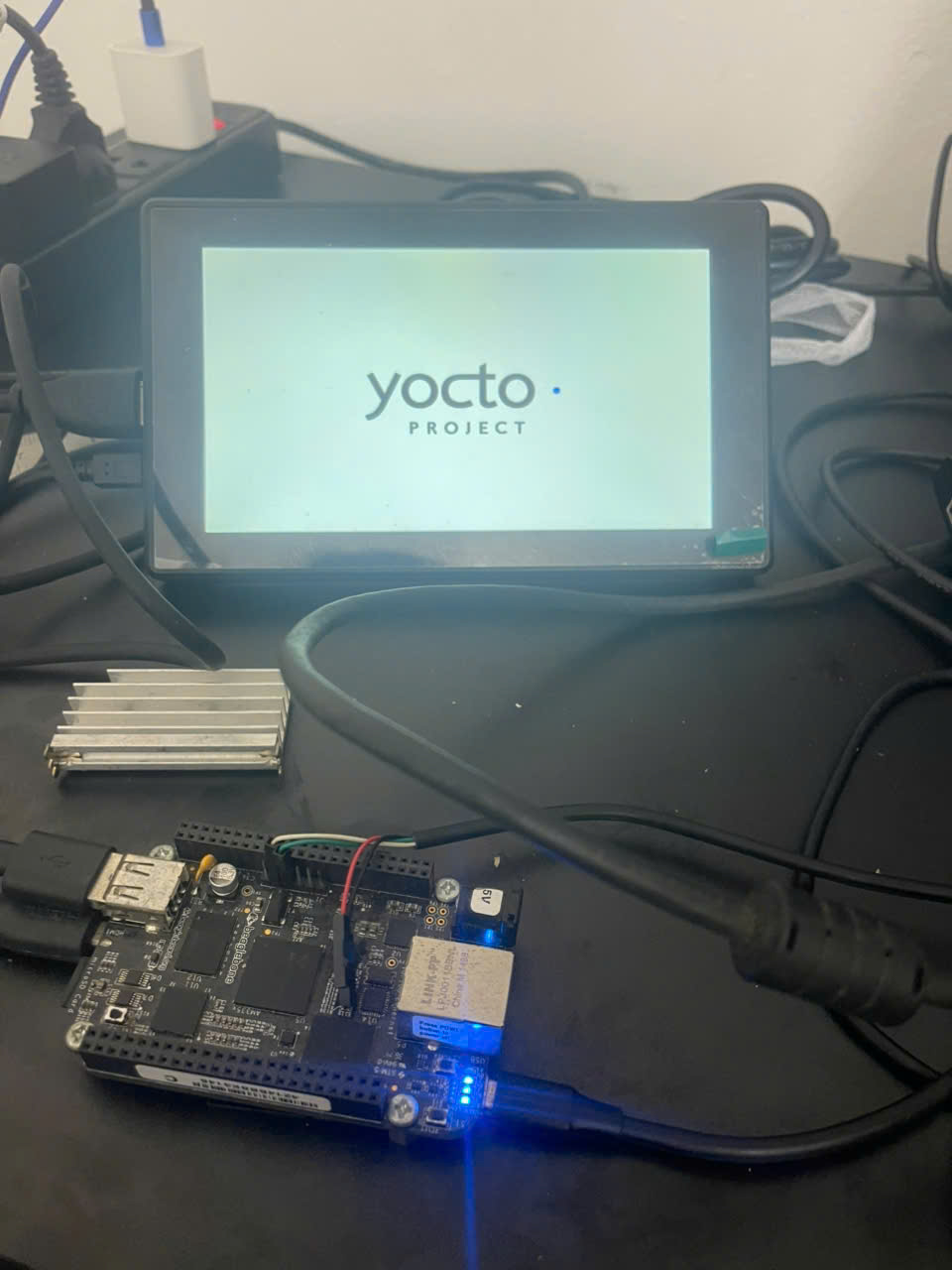
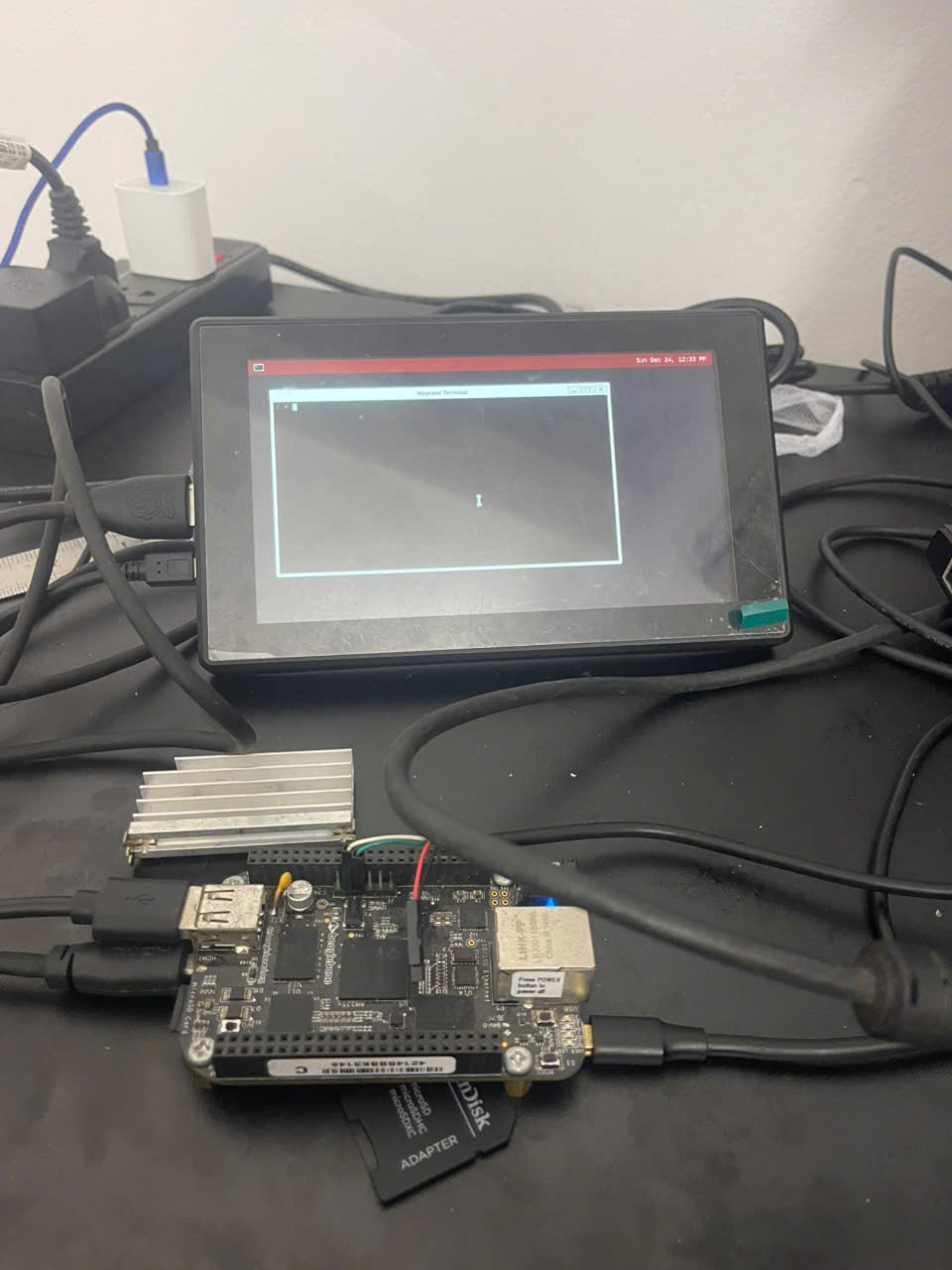
The result looks like this
2. Why I fixed it this way
2.1 Installing the weston systemd service
Of course, when touching this image the first thing I did was build and flash to test
bitbake core-image-weston
Then I powered up the board: black screen. I was going to run
systemctl status weston
And realised that if you don't set it, yocto defaults to systemV, so I had to edit local.conf and reinstall to switch to systemd for convenience.
#local.conf

DISTRO_FEATURES:append = " systemd pam"
VIRTUAL-RUNTIME_init_manager = "systemd"
DISTRO_FEATURES_BACKFILL_CONSIDERED += "sysvinit"
VIRTUAL-RUNTIME_initscripts = ""
Reinstalled and the board came up again; this time I first ran it bare to see
weston --backend=drm-backend.so --tty=1 --log=/var/log/weston.log
Still an error. I tried looking up the error from weston.log online in various ways without luck, so I gave it to chatgpt 5 thinking to check, and it analysed it as
2. DRM backend crash
Segmentation fault
...
GL vendor: Imagination Technologies
GL renderer: PowerVR SGX 530

👉 Here Weston actually initializes the DRM + EGL + PowerVR driver, but segfaults afterwards.
This is a known issue with Weston 10.x on BeagleBone Black’s SGX530 driver:

The gl-renderer.so in Weston 10 tries to use features that the old PVR SGX530 doesn’t support → segfault.

On Debian/Yocto with BBB, Weston 8.0.0 is usually used (with patches for SGX530). Later Weston versions (>9) are unstable with TI’s PVR userspace.
Oh, so let me try downgrading from 10.0 to 8.0.
I clone poky/dunfell and copy it into meta-bbb as I described above.
The build with Weston 8.0 is ok
I edit weston.ini and weston.service again
/etc/xdg/weston/weston.ini
[core]
backend=fbdev-backend.so
renderer=pixman
require-input=false

[shell]
locking=false
panel-color=0x90ff0000
background-color=0xff002244
/etc/systemd/system/weston.service
[Unit]
Description=Weston Wayland Compositor on tty1
After=systemd-user-sessions.service
Conflicts=getty@tty1.service

[Service]
ExecStart=/usr/bin/weston --tty=1 --backend=fbdev-backend.so --log=/var/log/weston.log
Restart=on-failure
RestartSec=2
User=root
WorkingDirectory=/root

[Install]
WantedBy=graphical.target
systemctl daemon-reload
systemctl disable getty@tty1.service
systemctl enable weston.service
systemctl start weston.service
But the service still failed
systemctl status weston
root@beaglebone:~# systemctl status weston

* weston.service - Weston Wayland Compositor on tty1

Loaded: loaded (/etc/systemd/system/weston.service; enabled; vendor preset: disabled)

Active: activating (auto-restart) (Result: exit-code) since Sun 2023-12-24 11:01:13 UTC; 1s ago Process: 342

ExecStart=/usr/bin/weston --tty=1 --backend=fbdev-backend.so --renderer=pixman --log=/var/log/weston.log (code=exited, status=1/FAILURE)

Main PID: 342 (code=exited, status=1/FAILURE)
2.2. Checking /var/log/weston.log and finding the error
I decided to read /var/log/weston.log and the error was plain as day
/var/log/weston.log
Date: 2023-12-24 UTC [10:59:52.229]
weston 8.0.0 https://wayland.freedesktop.org
Bug reports to: https://gitlab.freedesktop.org/wayland/weston/issues/
Build: 8.0.0 [10:59:52.230]
Command line: /usr/bin/weston --tty=1 --backend=fbdev-backend.so --renderer=pixman --log=/var/log/weston.log [10:59:52.230]
OS: Linux, 6.1.80-ti, #1 SMP PREEMPT Fri Mar 22 02:57:54 UTC 2024, armv7l [10:59:52.230]

fatal: environment variable XDG_RUNTIME_DIR is not set.

Refer to your distribution on how to get it, or http://www.freedesktop.org/wiki/Specifications/basedir-spec on how to implement it.
XDG_RUNTIME_DIR is not set. This seems to be a classic Wayland error; I have hit it a few times before.
So let's keep fixing; for now I hardcode it by editing weston.service to add the line
Environment=XDG_RUNTIME_DIR=/run/user/0
Then restart the weston service and check the status. This time a new error appears.
systemctl status weston
root@beaglebone:~# systemctl status weston -l

* weston.service - Weston Wayland Compositor on tty1

Loaded: loaded (/etc/systemd/system/weston.service; enabled; vendor preset: disabled)

Active: active (running) since Sun 2023-12-24 11:04:11 UTC; 15s ago Process: 508

ExecStartPre=/bin/mkdir -p /run/user/0 (code=exited, status=0/SUCCESS)

Main PID: 510 (weston) Tasks: 3 (limit: 1040)

Memory: 11.7M

CGroup: /system.slice/weston.service
|- 510 /usr/bin/weston --tty=1 --backend=fbdev-backend.so
|- 511 /usr/libexec/weston-keyboard
- 512 /usr/libexec/weston-desktop-shell

Dec 24 11:04:11 beaglebone weston[510]: [11:04:11.803] libwayland: unable to lock lockfile /run/user/0/wayland-0.lock, maybe another compositor is running

Dec 24 11:04:11 beaglebone weston[510]: [11:04:11.803] Loading module '/usr/lib/weston/desktop-shell.so'

Dec 24 11:04:11 beaglebone weston[510]: [11:04:11.812] launching '/usr/libexec/weston-keyboard'

Dec 24 11:04:11 beaglebone weston[510]: [11:04:11.819] launching '/usr/libexec/weston-desktop-shell'

Dec 24 11:04:12 beaglebone weston[511]: could not load cursor 'dnd-move'

Dec 24 11:04:12 beaglebone weston[512]: could not load cursor 'dnd-move'

Dec 24 11:04:12 beaglebone weston[511]: could not load cursor 'dnd-copy'

Dec 24 11:04:12 beaglebone weston[511]: could not load cursor 'dnd-none'

Dec 24 11:04:12 beaglebone weston[512]: could not load cursor 'dnd-copy'

Dec 24 11:04:12 beaglebone weston[512]: could not load cursor 'dnd-none'
2.3 Fixing "could not load cursor 'dnd-none'"
(dnd = drag-and-drop)
From what I found, weston cannot find the theme, i.e. the cursor data. And checking the board, there is no /dev/input at all, even though I have the screen, mouse and keyboard all plugged in.
To add a Weston theme I install adwaita-icon-theme and adwaita-icon-theme-cursors, and fix the input error by adding libinput ...
We change local.conf to the following
local.conf
DISTRO_FEATURES:append = " systemd pam"
VIRTUAL-RUNTIME_init_manager = "systemd"
DISTRO_FEATURES_BACKFILL_CONSIDERED += "sysvinit"
VIRTUAL-RUNTIME_initscripts = ""

PREFERRED_VERSION_weston = "8.0.0"

IMAGE_INSTALL:append = " libxcursor evtest libinput xkeyboard-config weston-examples adwaita-icon-theme hicolor-icon-theme udev adwaita-icon-theme-cursors libinput-bin "

# Image side (pull in all modules or just what you need)
IMAGE_INSTALL:append = " kernel-modules kernel-module-evdev kernel-module-usbhid "

KERNEL_MODULE_AUTOLOAD:append = " evdev usbhid "
Rebuild, and now the board has /dev/input/event* receiving events from the mouse, keyboard and touch. To learn what you can do with /dev/input/event, have a look at a post I wrote earlier: [Linux] Configuring a Logitech mouse with Bash scripts
We also see the cursor data in /usr/share/icons/Adwaita/cursors
root@beaglebone:~# ls /usr/share/icons/Adwaita/cursors/ | grep dnf*
dnd-ask
dnd-copy
dnd-link
dnd-move
dnd-no-drop
dnd-none
We edit weston.service to use the Adwaita theme; after the change the dnd error no longer appears
weston.service
[Unit]
Description=Weston Wayland Compositor on tty1
After=systemd-user-sessions.service
Conflicts=getty@tty1.service

[Service]
ExecStartPre=/bin/rm -f /run/user/0/wayland-0.lock
ExecStartPre=/bin/mkdir -p /run/user/0
Environment=XDG_RUNTIME_DIR=/run/user/0
Environment=XCURSOR_PATH=/usr/share/icons
Environment=XCURSOR_THEME=Adwaita
ExecStart=/usr/bin/weston --tty=1 --backend=fbdev-backend.so --log=/var/log/weston.log
Restart=on-failure
RestartSec=2
User=root

[Install]
WantedBy=graphical.target
However, one warning still appears in /var/log/weston.log
[10:55:04.327] libwayland: unable to lock lockfile /run/user/0/wayland-0.lock, maybe another compositor is running

warning: XDG_RUNTIME_DIR "/run/user/0" ... must be 0700 (current 755)
About the lock error: after digging, I realised there is also a weston@.service running. So I had to mask it, and since I am running on tty1, I also disabled getty@tty1
There is one more error related to the spi ili9341 and dri. I don't know why it is there; it seems to be in the device tree and set up wrongly. So I blacklisted it as well
So in the end I arrived at the final fix described in section 1.