[Yocto-BBB] 15. Changing the Boot Logo
Translated from the Vietnamese original; wording may still be rough. Read the original →
Okay, in this post I show how to change the Boot Logo on the Beaglebone Black. At first I thought it would require deep research, but in reality changing it is quite simple. That is one of the nice things about Linux: there is support for so many Packages. My job is to find what I need and put it together.
1. Poking around
For this post I searched in many places online and came across this guide: https://oestudyard.blogspot.com/2012/04/change-gumstix-overo-booting-screen.html
And I learned that it really is psplash that controls the boot logo
So first I looked at the recipe bb file of psplash. Usually, to find a file like psplash.bb I search like this
zk47@ltu:~/Learning/yocto-bbb$ source poky/oe-init-build-env build-bbb/
zk47@ltu:~/Learning/yocto-bbb/build-bbb$ bitbake-layers show-recipes psplash
psplash:
  meta                 0.1+gitAUTOINC+44afb7506d
- But that still does not show its real location, so I use the bare way
zk47@ltu:~/Learning/yocto-bbb/build-bbb$ find .. -name "*psplash*.bb*"
../poky/meta-poky/recipes-core/psplash/psplash_git.bbappend
../poky/meta/recipes-core/psplash/psplash_git.bb
So we found the bb files, and note there is also a bbappend coming from meta-poky.
Here, historically, the meta layer belongs to open-embedded, and meta-poky belongs to poky, part of the Yocto Project, which is built on top of open-embedded
We check the 2 folders; which file looks the most suspicious? Right, it is psplash-poky-img.h
zk47@ltu:~/Learning/yocto-bbb/poky/meta/recipes-core/psplash$ tree
.
├── files
│   ├── psplash-init
│   ├── psplash-poky-img.h
│   ├── psplash-start.service
│   └── psplash-systemd.service
└── psplash_git.bb

zk47@ltu:~/Learning/yocto-bbb/poky/meta-poky/recipes-core/psplash$ tree
.
├── files
│   └── psplash-poky-img.h
└── psplash_git.bbappend

1 directory, 2 files
We see here that meta-poky overrides the original image file (changing it to the Yocto Project logo). So we do the same thing: create this img.h file
So how do we create the header file for this image? We continue reading section 2 of the Open-Embedded Study Yard
blog.
2. Creating img.h with make-image-header.sh
So the psplash repo provides a script to convert a normal image into img.h (it is like a bitmap image.)
There are 2 ways to get this script: 1 is to go to the repo directly and take the file content; 2 is to run bitbake so it clones from git, then take it from build-bbb.
I am learning yocto, so we do option 2.
zk47@ltu:~/Learning/yocto-bbb/build-bbb$ bitbake psplash
zk47@ltu:~/Learning/yocto-bbb/build-bbb$ bitbake -e psplash | grep ^WORKDIR
WORKDIR="/home/zk47/Learning/yocto-bbb/build-bbb/tmp/work/armv7at2hf-neon-poky-linux-gnueabi/psplash/0.1+gitAUTOINC+44afb7506d-r0"
Go to this WORKDIR folder, into the git folder, and copy make-image-header.sh to your own machine
zk47@ltu:~/Project/Boot_Logo$ ls -l
total 400
-rwxr-xr-x 1 zk47 zk47    255 Thg 9  14 21:38 make-image-header.sh
-rw-rw-r-- 1 zk47 zk47  31548 Thg 8  27 21:43 mylogo.png
Okay, I copy mylogo.png into the same folder, open a terminal and do the following steps
convert mylogo.png -background white -alpha remove -alpha off \
    -gravity center -extent 640x480 my-splash-640x480.png

./make-image-header.sh my-splash-640x480.png POKY
First convert my image to 640x480, then run the script. In the end we get the following files
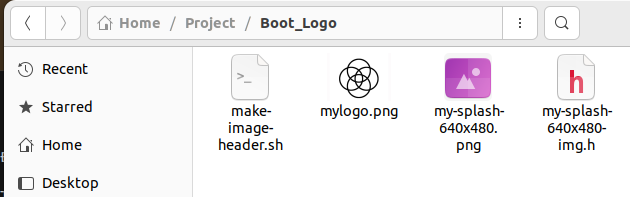
You can create a recipe to hold a bbappend file; I was a bit lazy, so I edited poky/meta-poky/recipes-core/psplash/files/psplash-poky-img.h directly with my content
Rebuild, and here is the result. Oh, note: remember to build an image with a GUI. Here I built core-image-weston; core-image-sato is also ok.
By this post I am running a bit short of ideas for Yocto-BBB, partly because of the limited hardware. Some features I built successfully on the STM32MP157 or i.MX91 fail over and over here, Weston being the typical example. So I will pause the Yocto-BBB series here for now. Please send me ideas, or any problems you hit working with Yocto-BBB. I will add more when I have time.
I will continue with the Boot-BBB series: the boot process, MLO, SPL, u-boot, busybox, fast boot.
Hope you keep reading !!!