[Boot-BBB] 1. Build a cross compiler toolchain with crosstool-ng
Translated from the Vietnamese original; wording may still be rough. Read the original →
Hi everyone, today I am starting a new series called Boot-BBB. This series is independent of the Yocto-BBB series. Here I will not use yocto; instead I will build crosstool-ng, u-boot, buildroot and busybox from source.
1. Why we start with the cross compiler toolchain
Embedded Linux consists of 4 main components
- Toolchain: the compiler and some other tools to produce code for the device.
- Bootloader: the program that initialises the board and loads the kernel
- Kernel: the heart of the system, managing resources and talking to the hardware
- Root file system: contains the libraries and programs that run once the kernel has finished initialising
A toolchain has two kinds of compiler:
- Native compiler: compiles on and for the same architecture (e.g. build on ARM for ARM).
Cross-compiler: compiles on one architecture (an x86_64 laptop) but produces code for another architecture (ARM).
In practice, a cross-compiler is usually faster and more convenient for developers (the build machine is more powerful, and it is easy to automate).
In this post I use crosstool-ng to create a toolchain for cross-compile.
2 Compile crosstool-ng
Clone the source code
git clone https://github.com/crosstool-ng/crosstool-ng
cd crosstool-ng/
Configure it locally instead of exporting to PATH
./bootstrap
./configure --enable-local
Then compile
make
3. Create a toolchain for the Beaglebone Black with crosstool-ng
You can check the sample list to see which boards match; here the Beaglebone Black uses an a8 chip, so I check
zk47@ltu:~/Learning/Bootlin_practice/tmp/crosstool-ng$ ./ct-ng list-samples | grep a8
[L...]   arm-cortex_a8-linux-gnueabi

./ct-ng arm-cortex_a8-linux-gnueabi
Okay, now we have to pick the right build options
./ct-ng menuconfig
The interface looks like this
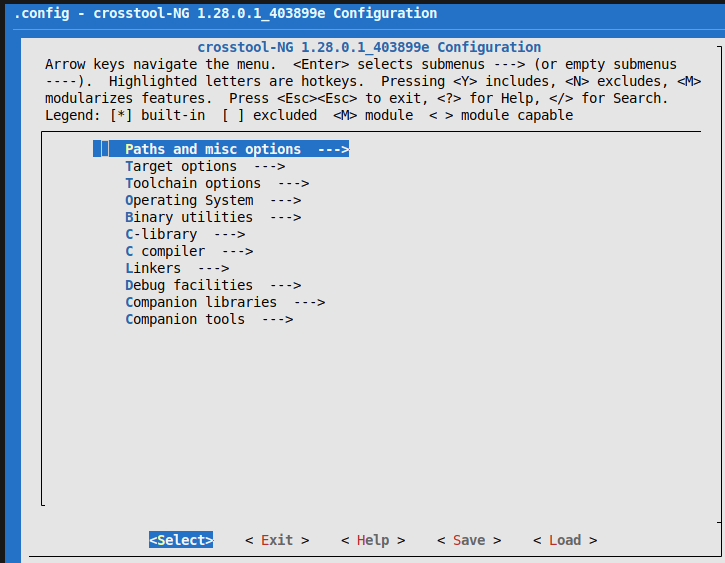
- Paths and misc options:
- Logging:
- Maximum Log Level to see = DEBUG
- Logging:
- Target options
- Target optimisations:
- Use specific FPU = vfpv3
- Floating point to hardware = FPU
- Target optimisations:
- Toolchain Options
- Tuple completion and aliasing
- Tuple's vendor string = training
- Tuple's alias = arm-linux
- Tuple completion and aliasing
- Operating System
- Target for OS
- Options for linux
- Version of linux = 5.15.x
- Options for linux
- Target for OS
- C library
- C library = uClibc-ng
- C compiler
- Options for gcc
- Version of gcc (11.x.x)
- Additional supported languages:
- C++ = * (press space to toggle)
- Options for gcc
Then choose save and exit
Okay, let's build
./ct-ng build
Wait for it to finish; your output will be in
$HOME/x-tools/arm-training-linux-uclibcgnueabihf/bin
To use it from anywhere, add it to the PATH of the current session
export PATH=$HOME/x-tools/arm-training-linux-uclibcgnueabihf/bin:$PATH
4. Test the newly created toolchain
Let's try compiling this extremely simple C code
#include
#include

int main (void)
{
    printf( "Hello world!\n" );
    return EXIT_SUCCESS;
}
Save it as helloworld.c
Compile it with the command
arm-linux-gcc -o helloworld helloworld.c
Copy this helloworld to the board and run it and it will be fine. Or we can simply test with qemu-arm
sudo apt install qemu-user
If you run it right away you get an error
zk47@ltu:~/Learning/Bootlin_practice/tmp/crosstool-ng$ qemu-arm hello
qemu-arm: Could not open '/lib/ld-uClibc.so.0': No such file or directory
So we need to point it to the libraries when running
zk47@ltu:~/Learning/Bootlin_practice/tmp/crosstool-ng$ qemu-arm -L ~/x-tools/arm-training-linux-uclibcgnueabihf/arm-training-linux-uclibcgnueabihf/sysroot hello
Hello world!