[Boot-BBB] 5. Create a Beaglebone Black image with Buildroot
Translated from the Vietnamese original; wording may still be rough. Read the original →
In this post I show you how to use Buildroot to create a Beaglebone Black image. Simply put, Buildroot is similar to the Yocto Project but leaner, with less configuration. The end goal is to build a custom embedded linux image
1. Clone the source code
git clone https://git.buildroot.net/buildroot
We checkout the latest build version
cd buildroot
git branch -a
Scroll to the bottom; mine is branch remotes/origin/2025.08.x, so I checkout this branch
git checkout 2025.08
2. Configure Buildroot
make menuconfig
Following the bootlin buildroot labs
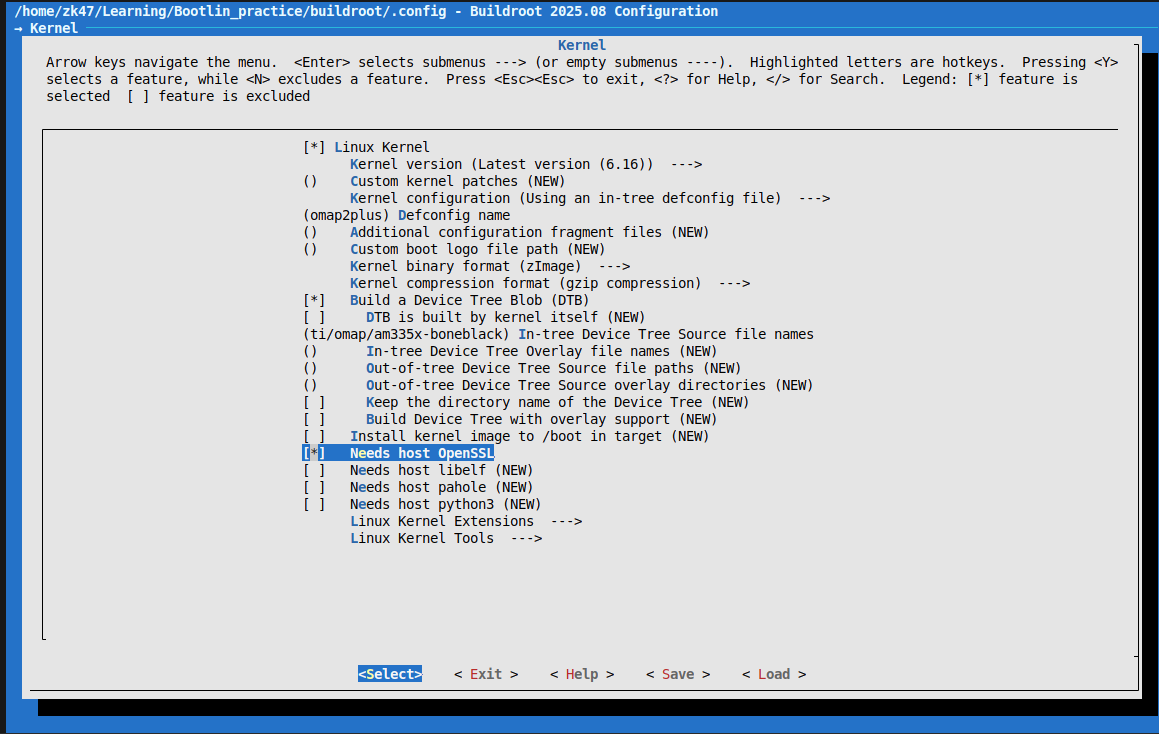
We choose the following configuration
- Target Options
- Target Architecture
- Arm little endian
- Target Architecture Variant
- cortex-A8
- Target Architecture
- Toolchain
- Toolchain type
- External toolchain
- Toolchain type
- System Configuration (these settings are up to you)
- System hostname
- beaglebone
- System banner
- Zk47's Buildroot Image
- Enable root login
- Root password
- test
- Root password
- System hostname
- Kernel
- Linux Kernel
- *
- Defconfig name
- omap2plus
- Kernel binary format
- zImage
- Build a Device Tree Blob (DTB), see https://git.kernel.org/pub/scm/linux/kernel/git/torvalds/linux.git/tree/arch/arm/boot/dts/ti/omap?id=v6.9
- *
- In-tree Device-Tree Source file name
- ti/omap/am335x-boneblack
- In-tree Device-Tree Source file name
- *
- Linux Kernel
Target Packages: remember to enable Busybox; beyond that you can add gdb, valgrind, dropbear, or even games
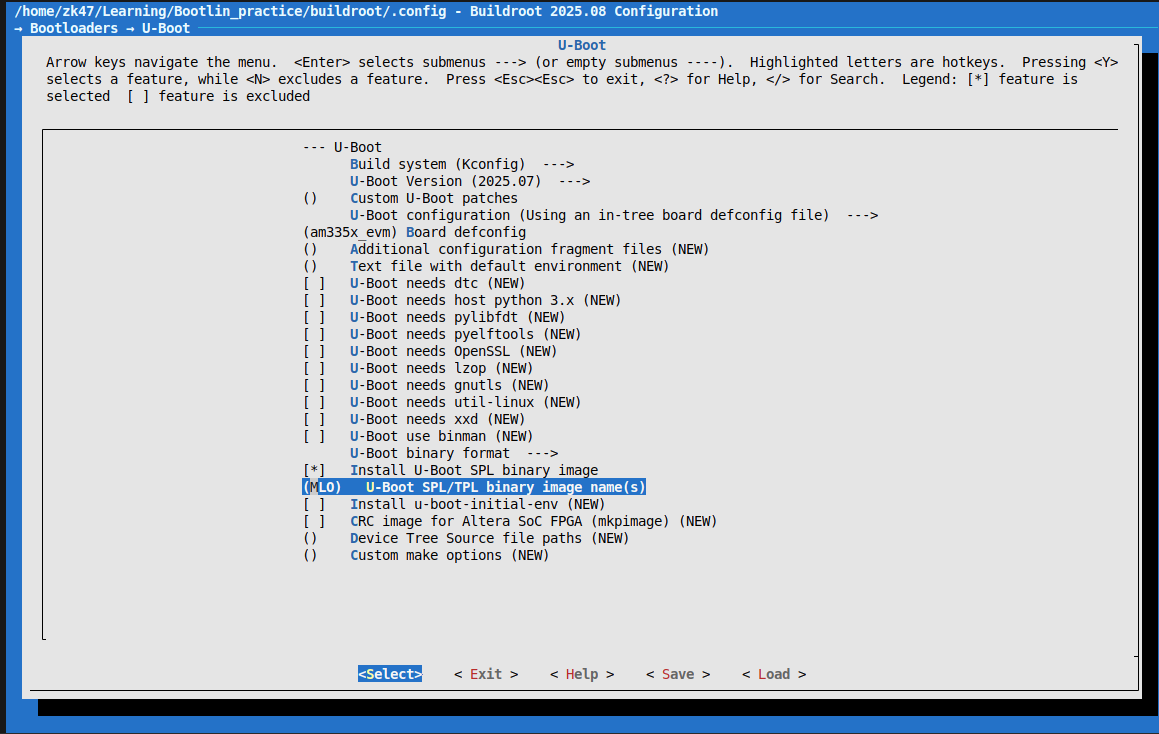
Bootloader
- U-boot
- *
- Board defconfig
- am335x_evm
- U-boot binary format
- Enable only u-boot.img
- U-boot
3. Build buildroot
make 2>&1 | tee build.log
After running for a while I got an error
tools/mkeficapsule.c:20:10: fatal error: gnutls/gnutls.h: No such file or directory
   20 | #include
      |          ^~~~~~~~~~~~~~~~~
compilation terminated.
make[3]: *** [scripts/Makefile.host:112:
This error is similar to the openssl error in post 4; I am simply missing the needed libraries and packages.
Again I searched google with the keyword Buildroot prerequisites. And here are all the needed packages, better too many than too few :vv
sudo apt-get update && sudo apt-get install -y \
  build-essential git wget curl cpio unzip rsync file bc \
  bison flex gawk texinfo \
  libssl-dev libgnutls28-dev uuid-dev \
  libncurses5-dev libncursesw5-dev \
  libglib2.0-dev libpixman-1-dev \
  python3 python3-matplotlib \
  asciidoc w3m dblatex graphviz \
  patch diffutils perl sed tar gzip bzip2 findutils make binutils
The make takes quite long because it both fetches the kernel source code and builds. It took about 40 minutes on my machine
Okay, once the build is done, the results are in output/images
zk47@ltu:~/Learning/Bootlin_practice/buildroot/output/images$ ls
am335x-boneblack.dtb  MLO  rootfs.tar  u-boot.img  zImage
Exactly like posts 2 and 3
Replace the MLO, u-boot.img, zImage and am335x-boneblack.dtb files on the boot partition of the SD card
Then wipe the rootfs partition and extract rootfs.tar into it
sudo umount /dev/mmcblk0p2
sudo mkfs.ext4 -L rootfs /dev/mmcblk0p2
I clear this partition first, then extract into it
sudo tar -C /media/$USER/rootfs/ -xf rootfs.tar
sync
Okay, let's test again on the board
[    4.019342] VFS: Mounted root (ext4 filesystem) on device 179:2.
[    4.025955] devtmpfs: mounted
[    4.033920] Freeing unused kernel image (initmem) memory: 2048K
[    4.041332] Run /sbin/init as init process
[    4.292822] EXT4-fs (mmcblk0p2): re-mounted 2977d641-4bac-4ed7-89c4-e22fbc9812e3 r/w. Quota mode: disabled.
Saving 256 bits of creditable seed for next boot
Starting syslogd: OK
Starting klogd: OK
Running sysctl: OK
Starting network: OK
Starting crond: OK

Zk47's buildroot image
bbb login: test
Password:
Login incorrect
bbb login: root
Password:
# ls
# ls
# which cat
/bin/cat
# ls -al /bin/cat
lrwxrwxrwx    1 root     root             7 Sep 21  2025 /bin/cat -> busybox
It works; here you can also see the utilities are actually still built with busybox.
Okay. Creating an image with buildroot is much simpler than with Yocto.
In the next post I will use UART and TFTP to send files to u-boot instead of copying them to the SD card.
Hope you keep reading and supporting