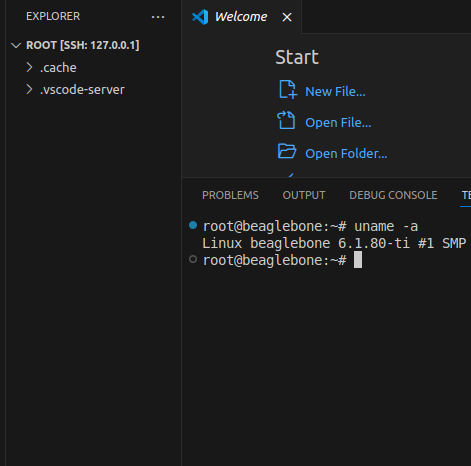
[Yocto-BBB] 16. Enabling ADB, SSH port forwarding
Translated from the Vietnamese original; wording may still be rough. Read the original →
ADB: Android Debug Bridge
In this post I show you how to configure the image build with ADB to make transferring files over USB more convenient, as well as Port Forwarding so we can use ssh over USB.
1. Android Debug Bridge (ADB)

1.1 Overview
Looking only at the definition of ADB, many of you may think: I am building Yocto, why use some Android thing here? In fact ADB is a command-line tool used over USB. So it is a useful tool whenever you connect over USB, not only for Android.
1.2 What ADB is used for
ADB is a versatile tool that can do many things. Personally I use it most to access the terminal on the board and to copy files from the board to the host and back.
Some commands I use often
1.2.1. adb devices
Checks whether any device is connected
zk47@ltu:~$ adb devices
List of devices attached
0123456789ABCDEF	device
38191JEHN00602	device
1.2.2 adb root
Runs the adb server as root
1.2.3 adb shell
Accesses the terminal on the board.
zk47@ltu:~$ adb shell
sh-5.1# uname -a
Linux beaglebone 6.1.80-ti #1 SMP PREEMPT Fri Mar 22 02:57:54 UTC 2024 armv7l armv7l armv7l GNU/Linux
1.2.4 adb pull & adb push
Pull: pulls, copies a file from the board
Push: pushes a file from the host to the board
sh-5.1# pwd
/home/root
sh-5.1# touch test.file
sh-5.1# exit
zk47@ltu:~$ adb pull /home/root/test.file .
/home/root/test.file: 1 file pulled, 0 skipped.
zk47@ltu:~$ ls -al test.file
-rw-r--r-- 1 zk47 zk47 0 Thg 11 18 19:49 test.file
1.2.5 adb kill-server
Kills the current adb process
2. Integrating ADB into the Yocto image build
First I searched online to see how people do it. I found the openembedded recipe at https://layers.openembedded.org/layerindex/recipe/399905/
android-tools belongs to meta-oe in meta-openembedded
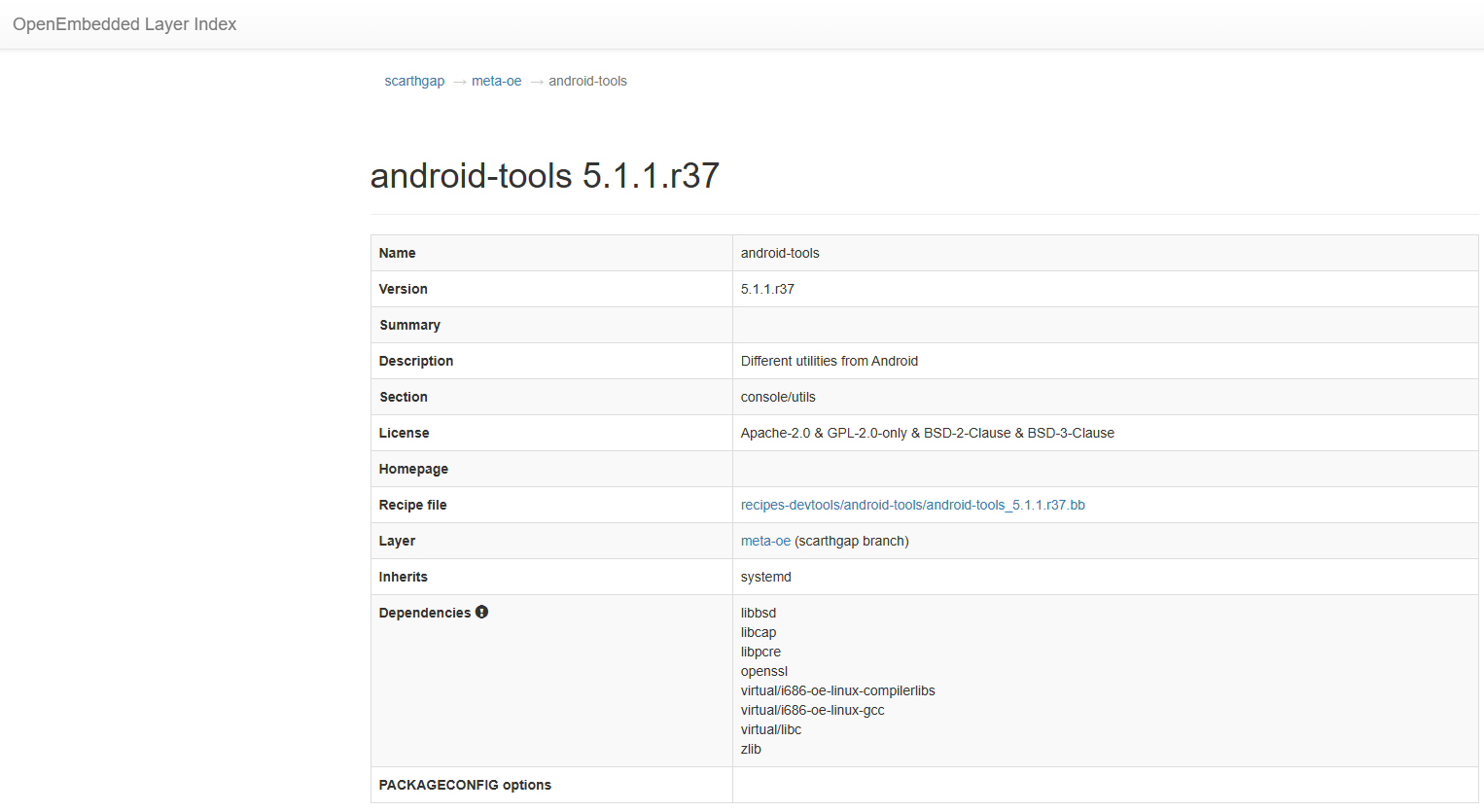
And a guide here https://community.nxp.com/t5/i-MX-Processors-Knowledge-Base/adbd-test-on-Yocto/ta-p/1763377
So after a few tests, I arrived at the following build approach that works well on the Beaglebone Black.
2.1 Edit local.conf
We add the following line to ${BUILDDIR}/conf/local.conf
#Switch to systemd, run the adbd service
DISTRO_FEATURES:append = " systemd "
VIRTUAL-RUNTIME_init_manager = "systemd"
DISTRO_FEATURES_BACKFILL_CONSIDERED += "sysvinit"
VIRTUAL-RUNTIME_initscripts = ""

#Add usb support
KERNEL_MODULE_AUTOLOAD:append = " evdev usbhid "

#Add the android tools package
IMAGE_INSTALL:append = "android-tools android-tools-adbd"
PREFERRED_PROVIDER_android-tools-conf = "android-tools-conf-configfs"
2.2 Create an image recipe
Here, to avoid adding a bbappend recipe in every post, I create a recipe called my-image.bb
SUMMARY = "My custom Linux Image"
IMAGE_INSTALL = "packagegroup-core-boot ${CORE_IMAGE_EXTRA_INSTALL}"
IMAGE_LINGUAS = " "
LICENSE = "MIT"
inherit core-image

inherit extrausers
#User = "root" - Pass = "test"
PASSWD = "\$5\$y9Aeg5ctwntRHo/g\$CAKtoTfQg7VPGfVAMGo5ZG/0GJLn3AD0JdoQ.i0dDFC"
EXTRA_USERS_PARAMS = "\
    usermod -p '${PASSWD}' root; \
    "

#Network  and ssh packages
IMAGE_INSTALL:append = " \
    dhcpcd \
    iw \
    wpa-supplicant \
    linux-firmware \
    net-tools \
    iproute2 \
    openssh \
"

#SSH VSCode server package
IMAGE_INSTALL:append = " \
    bash \
    tar \
    xz \
    procps \
    coreutils \
    curl \
    libgcc \
    libstdc++ \
    libatomic \
"
Also remember to add poky/meta-openembedded/meta-oe to ${BUILDDIR}/conf/bblayers.conf
And now build
bitbake my-image
3. Flash and test adb
As usual, use bmaptool to flash the image.
We check the status of the adbd service
root@beaglebone:~# systemctl status android-tools-adbd.service
* android-tools-adbd.service - Android Debug Bridge
     Loaded: loaded (/lib/systemd/system/android-tools-adbd.service; enabled; vendor preset: enabled)
    Drop-In: /lib/systemd/system/android-tools-adbd.service.d
             `-10-adbd-configfs.conf
     Active: inactive (dead)
  Condition: start condition failed at Sun 2023-12-24 10:50:39 UTC; 26s ago
             `- ConditionPathExists=/etc/usb-debugging-enabled was not met

Dec 24 10:50:39 beaglebone systemd[1]: Android Debug Bridge was skipped because of a failed condition check (ConditionPathExists=/etc/usb-debugging-enabled).
So adbd failed to start, but the fix is clearly shown in the log: this service has ConditionPathExists=/etc/usb-debugging-enabled, so we need to create that path
root@beaglebone:~# mkdir /etc/usb-debugging-enabled
root@beaglebone:~# systemctl restart android-tools-adbd.service
[ 1667.131481] file system registered
[ 1667.329830] ffs_data_put(): freeing
[ 1667.387046] unloading
[ 1667.448546] file system registered
[ 1667.593878] read descriptors
[ 1667.596846] read strings
root@beaglebone:~# systemctl status android-tools-adbd.service
* android-tools-adbd.service - Android Debug Bridge
     Loaded: loaded (/lib/systemd/system/android-tools-adbd.service; enabled; vendor preset: enabled)
    Drop-In: /lib/systemd/system/android-tools-adbd.service.d
             `-10-adbd-configfs.conf
     Active: active (running) since Sun 2023-12-24 11:53:28 UTC; 2s ago
    Process: 361 ExecStartPre=/usr/bin/android-gadget-setup adb (code=exited, status=0/SUCCESS)
    Process: 370 ExecStartPre=/usr/bin/android-gadget-setup (code=exited, status=0/SUCCESS)
    Process: 389 ExecStartPost=/usr/bin/android-gadget-start (code=exited, status=0/SUCCESS)
   Main PID: 388 (adbd)
      Tasks: 4 (limit: 1040)
     Memory: 432.0K
     CGroup: /system.slice/android-tools-adbd.service
             `- 388 /usr/bin/adbd

Dec 24 11:53:24 beaglebone systemd[1]: Starting Android Debug Bridge...
Dec 24 11:53:24 beaglebone android-gadget-setup[372]: killall: adbd: no process killed
Dec 24 11:53:28 beaglebone systemd[1]: Started Android Debug Bridge.
Works right away :vv
Now from the computer. Download Android Platform Tools from Google's site https://developer.android.com/tools/releases/platform-tools
After installing Platform-tools, which is ADB on the host, we test and connect successfully
zk47@ltu:~$ adb devices
List of devices attached
0123456789ABCDEF	device

zk47@ltu:~$ adb shell
sh-5.1# uname -a
Linux beaglebone 6.1.80-ti #1 SMP PREEMPT Fri Mar 22 02:57:54 UTC 2024 armv7l armv7l armv7l GNU/Linux
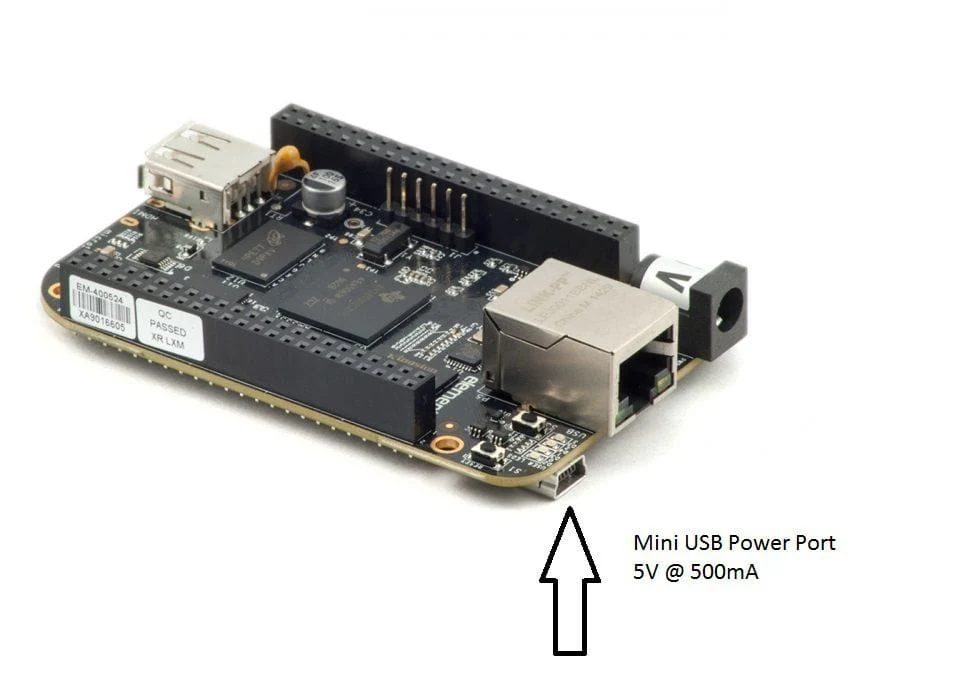
Note: on the Beaglebone Black, connect the board to the host through the mini USB port, not the USB port. Because the mini USB port is the USB OTG / USB Client port, which lets the Beaglebone Black act as a peripheral plugged into the host
4. Port forwarding SSH over ADB
But the problem with ADB is that, although it is very convenient since you only need a USB cable, it still has no interface as handy to work with as MobaXterm or VSCode. So here I forward the port used for ssh through ADB, so that from the PC we can SSH in
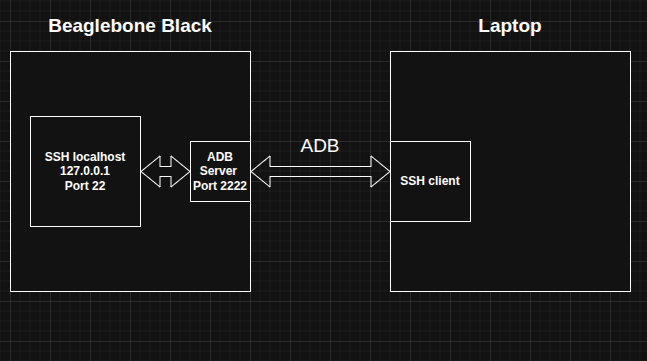
I do it the same way as above.
On the host we run a script with the following content
#!/usr/bin/env bash
#
# Setup SSH over ADB for a Yocto/BBB device and forward port for VS Code
#

set -u

ADB=${ADB:-adb}
SSH_PORT=${1:-2222}       # local port to forward to device's :22

echo "[*] Using ADB binary: ${ADB}"
echo "[*] Local SSH port for forwarding: ${SSH_PORT}"
echo

echo "[*] Waiting for ADB device..."
${ADB} wait-for-device

echo "[*] Trying to restart adbd as root (ignore error if not supported)..."
if ! ${ADB} root >/dev/null 2>&1; then
    echo "    (adbd root not supported or already root; continuing)"
fi
sleep 2

echo "[*] Trying to remount / as read-write (may be already rw or read-only)..."
if ! ${ADB} shell "mount -o remount,rw /" >/dev/null 2>&1; then
    echo "    (remount / failed; rootfs may already be rw or is truly read-only)"
fi

echo "[*] Setting root shell to /bin/bash if available..."
${ADB} shell "command -v bash >/dev/null 2>&1 && chsh -s /bin/bash root || true"

echo "[*] Setting root password to 'root' (lab use only – change in real setups)..."
${ADB} shell "echo -e 'root\nroot' | passwd root" || true

echo "[*] Updating /etc/ssh/sshd_config to allow root/password login..."
${ADB} shell "sed -i 's/^#\?PermitRootLogin.*/PermitRootLogin yes/' /etc/ssh/sshd_config" || true
${ADB} shell "sed -i 's/^#\?PasswordAuthentication.*/PasswordAuthentication yes/' /etc/ssh/sshd_config" || true

echo "[*] Generating SSH host keys if needed (ssh-keygen -A)..."
${ADB} shell "ssh-keygen -A" >/dev/null 2>&1 || true

echo "[*] Restarting SSH daemon/socket on device..."
${ADB} shell "systemctl restart sshd.socket 2>/dev/null || \
              systemctl restart sshd 2>/dev/null || \
              service ssh restart 2>/dev/null || \
              /etc/init.d/sshd restart 2>/dev/null || true"

echo "[*] Setting up ADB port forwarding: host tcp:${SSH_PORT} -> device tcp:22..."
${ADB} forward "tcp:${SSH_PORT}" tcp:22

echo
echo "=== SSH over ADB is ready ==="
echo "Connect from host with:"
echo "  ssh -p ${SSH_PORT} root@127.0.0.1"
echo
echo "VS Code Remote-SSH settings:"
echo "  Host: localhost"
echo "  Port: ${SSH_PORT}"
echo "  User: root"
echo
Then add the config to VS code (similar to post Yocto-BBB 6)
ssh -p 2222 root@127.0.0.1
And tada, we have an interface for more convenient programming