[Yocto-MX93] 1. Building imx-image-full for the FRDM-i.MX93
Translated from the Vietnamese original; wording may still be rough. Read the original →
In the Yocto series for the Beaglebone Black and STM32MP157 I did a lot of basic features, how to use yocto, working up from core-image-minimal. This time I build the features for the FRDM i.MX93 board starting straight from the vendor's full image.
1. Initialise the repo and get the source code
First download the i.MX SW 2024 Q3 BSP Release
repo init -u https://github.com/nxp-imx/imx-manifest -b imx-linux-scarthgap -m imx-6.6.36-2.1.0.xml
repo sync
Next download the FRDM-MX93 layer into Yocto's source folder
cd ${MY_YOCTO}/sources
git clone https://github.com/nxp-imx-support/meta-imx-frdm.git
I tried building core-image-minimal for this board before; without meta-imx-frdm, the kernel build cannot find the Device Tree for the board, because NXP has not pushed this board's DT to mainline Linux git (or it has not been merged yet)
2. Build configuration, and fixing build errors
2.1 Build configuration
We configure the machine and distro. In earlier Yocto posts I set MACHINE and DISTRO directly in local.conf, but you can also export these 2 variables in the terminal when running
MACHINE=imx93frdm DISTRO=fsl-imx-xwayland source sources/meta-imx-frdm/tools/imx-frdm-setup.sh -b frdm-imx93
One note for later runs: every time you run the command above, local.conf and bblayers.conf are reset to the template from the sample repo.
So if you change anything in local.conf or bblayers.conf, copy them somewhere first and copy them back after running it. Otherwise you add layers or new config in local.conf and then see no change when rebuilding.
To build we run
bitbake imx-image-full
My machine has 14 cores 20 threads, and it took about 5 hours, if I remember right
2.2 Fixing build errors
During the build I hit the following error while building the onnxruntime recipe (a recipe related to Machine learning or something)
undefined reference to `onnxruntime::perftest::CommandLineParser::Show Usage()After searching online I found someone with a similar error when building onnxruntime, though not on Yocto, at https://github.com/microsoft/onnxruntime/issues/4273
I did the same and edited the onnxruntime.bb file directly
zk47@ltu:~/Learning/yocto-imx93/sources/meta-imx/meta-imx-ml/recipes-libraries/onnxruntime$ git diff onnxruntime_1.17.1.bb
diff --git a/meta-imx-ml/recipes-libraries/onnxruntime/onnxruntime_1.17.1.bb b/meta-imx-ml/recipes-libraries/onnxruntime/onnxruntime_1.17.1.bb
index 8570e080f9..694fab34e5 100644
--- a/meta-imx-ml/recipes-libraries/onnxruntime/onnxruntime_1.17.1.bb
+++ b/meta-imx-ml/recipes-libraries/onnxruntime/onnxruntime_1.17.1.bb
@@ -7,6 +7,7 @@ LIC_FILES_CHKSUM_model = "file://${S}/example-models/squeezenet/LICENSE;md5=3b83
 LIC_FILES_CHKSUM = "${LIC_FILES_CHKSUM_runtime} ${LIC_FILES_CHKSUM_model}"

 DEPENDS = "libpng zlib"
+DEPENDS += " protobuf re2 rsync"

 inherit setuptools3

@@ -33,6 +34,13 @@ EXTRA_OECMAKE += "\
     -Donnxruntime_BUILD_UNIT_TESTS=ON \
 "

+EXTRA_OECMAKE += "\
+    -DProtobuf_PROTOC_EXECUTABLE=${STAGING_BINDIR_NATIVE}/protoc \
+    -DProtobuf_INCLUDE_DIR=${STAGING_INCDIR} \
+    -DProtobuf_LIBRARY=${STAGING_LIBDIR}/libprotobuf.so \
+    -Donnxruntime_USE_NSYNC=ON \
+"
+
 PYTHON_DEPENDS = "\
     ${PYTHON_PN} \
     ${PYTHON_PN}-pip-native \
And we rebuild right away; to avoid errors caused by the ccache from the previous task (I think because of the cache, after the fix I then got an error in qtbase), we run the following task
bitbake -c cleansstate qtbase && bitbake -c cleanall onnxruntime
bitbake imx-image-full
3. Flash the SD card and use the GoPoint demo
3.1 Flash the SD card
Go to the Output folder (you can check the $WORKDIR variable) and flash the sd card (replace /dev/sdX with your SD card)
zstdcat imx-image-full-imx93frdm.rootfs.wic.zst | sudo dd of=/dev/sdx bs=1M && sync
Another suggestion is to use the uuu tool
uuu -b sd_all imx-image-full-imx93frdm.rootfs.wic.zst
The default config currently does not produce a bmap image, so you can't use bmaptool as in the Yocto series I wrote before
3.2 Plug in the card and the GoPoint demo
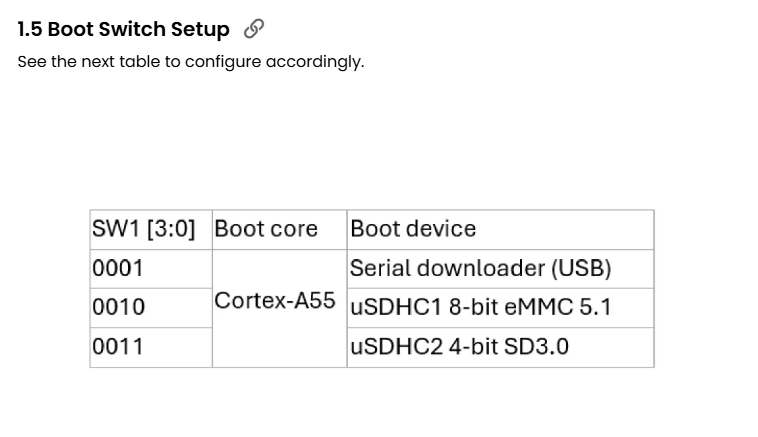
Select 0011 on the boot switch to boot from the uSD card
The power port and the Serial Debug port on the board are those 2 type C connectors.
On Linux it will be /dev/ttyACM0; open this port
sudo picocom -b 115200 /dev/ttyACM0
This image has a GUI, so also plug in a screen to try the GoPoint demo
You can read more guides from the vendor to get Matter, and to build Debian 12 for the board