[Yocto-BBB] 19. Sharing sstate to speed up builds
Translated from the Vietnamese original; wording may still be rough. Read the original →
1. Setting up the HTTP server
Here I use nginx, but you can use simpler methods. All we are doing is sharing the sstate-cache folder from one machine that has already built yocto to another machine on the same network
sudo apt update
sudo apt install nginx -y

cat << 'EOF' | sudo tee /etc/nginx/sites-available/yocto-sstate
server {
    listen 8080;
    server_name _;

    location /sstate-cache/ {

        alias /home/zk47/Youtube/Yocto/yocto-bbb/poky/build-bbb/sstate-cache/;
        autoindex on;
    }
}
EOF

sudo ln -sf /etc/nginx/sites-available/yocto-sstate /etc/nginx/sites-enabled/
sudo nginx -t
sudo systemctl restart nginx
However, opening the link gives 403 Forbidden
So we have to change the configuration. NGINX (running as the www-data user) currently has no permission to access the sstate-cache folder, because the machine's home folder denies read and execute to other users
So we change the user NGINX runs as to the current user; mine is zk47
sudo sed -i 's/user www-data;/user zk47;/g' /etc/nginx/nginx.conf
# Restart nginx
sudo systemctl restart nginx
Okay, now opening the link above again we see the shared state folder
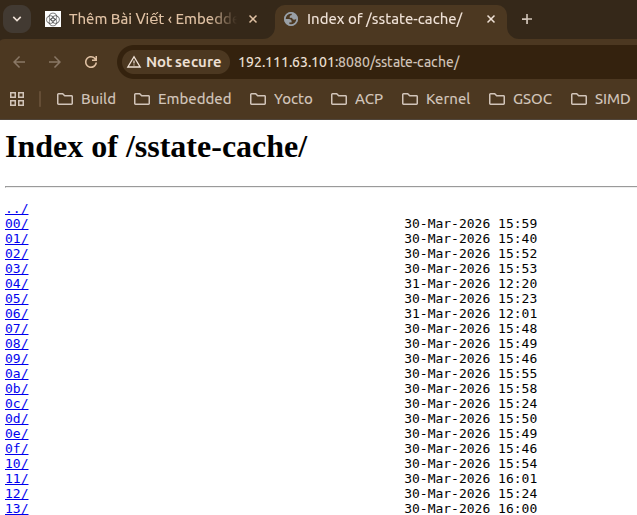
So we have put the folder on the network
2. Client side configuration
2.1 Configuration
For this demo I rebuilt yocto-bbb completely from scratch
In local.conf (best copied exactly from the server)
MACHINE = "beaglebone"
DISTRO ?= "poky"

SSTATE_MIRRORS ?= "file://.* http://192.111.63.101:8080/sstate-cache/PATH;downloadfilename=PATH"
BB_HASHSERVE = "192.111.63.101:8687"
BB_SIGNATURE_HANDLER = "OEEquivHash"
Here we have the option BB_SIGNATURE_HANDLER = 'OEEquivHash'
It tells BitBake to use the signature handler named OEEquivHash, a handler that supports Hash Equivalence.
In Yocto/BitBake, each task (for example do_compile, do_install) gets a task hash based on its inputs (source code, configuration variables, dependencies…). This hash decides whether the sstate-cache (existing build results) can be reused or the task must be rebuilt.
With the default signature handler (OEBasicHash), if any input changes → the hash changes → it must be rebuilt, even when the actual output is exactly the same.
OEEquivHash solves this by:
- After a task finishes, it computes the output hash (the hash of the actual output).
- The output hash is sent to the hash equivalence server (in your file that is
BB_HASHSERVE = "192.111.63.101:8687"). - The server stores the mapping: task hash A → output hash X.
- When another machine (or another build) has a different task hash B but the server knows the output hash will also be X → BitBake treats the two tasks as equivalent and reuses the existing sstate-cache instead of rebuilding.
A practical example
- You change a comment in a recipe → the task hash changes, but the binary output is exactly the same.
- With
OEBasicHash: rebuild everything. - With
OEEquivHash: the server recognises the output hash is the same → skip it and use the cache → saves significant time.
2.2 Result
And now we run it
source oe-init-build-env build-bbb
bitbake core-image-minimal
Checking sstate mirror object availability: 100% |###############################################################################################################################| Time: 0:01:12
Sstate summary: Wanted 1914 Local 0 Mirrors 520 Missed 1394 Current 0 (27% match, 0% complete)
NOTE: Executing Tasks
Setscene tasks: 1914 of 1914
This is only a 27% match, not very high, because my 2 machines still have different configs
If you finish a build on one machine and copy exactly the same config and the same structure, the cache hit rate can reach 99%
This post is quite short, but I still wrote it because I find it quite useful; hope it helps :vv